
Subnet Proxy (Point-to-Network)
Subnet Proxy refers to the functionality where a device forwards traffic destined for the subnets under it to the EasyTier VPN, so that other devices in the virtual network can access the subnets under that device. QtEasyTier supports convenient subnet proxy configuration through its GUI.
Assume the network topology is as follows: node B wants to share the subnet 192.168.1.0/24 it can access with other nodes.
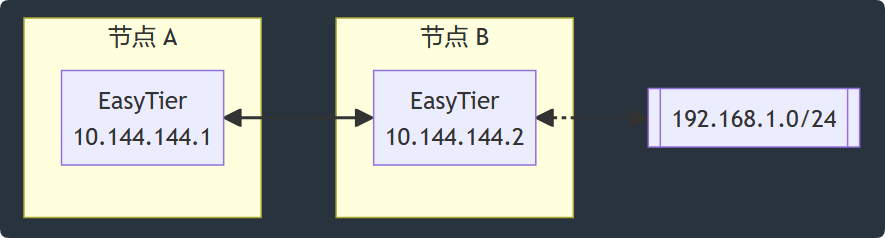
Node B only needs to click the “Add Proxy Subnet” button on the Network Configuration -> Advanced Settings -> Network Services page to configure it.
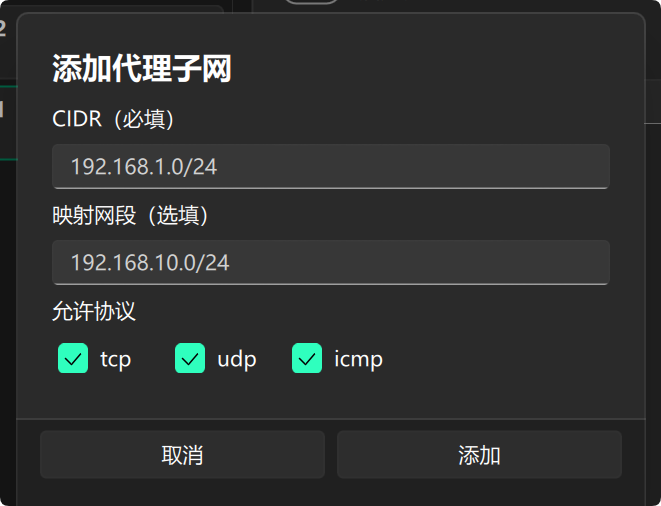
As shown in the figure above, you need to enter the CIDR address of the subnet to be proxied. For example, to proxy the subnet from 192.168.1.1 to 192.168.1.254 under the device, just enter 192.168.1.0/24.
If subnet mapping is needed, enter the mapped subnet in the “Subnet Mapping” field. For example, to map 192.168.1.0/24 to 10.144.144.0/24, enter 10.144.144.0/24. Note that the size of the mapped subnet must be the same as the original subnet, i.e., the prefix length of the subnet mapping must match the CIDR of the proxy subnet; otherwise, the instance will fail to start.
You can also choose the transport protocols (tcp, udp, icmp) allowed for proxying, which default to all protocols.
The added proxy subnets will be displayed on the settings page, and you can add multiple subnets to proxy.
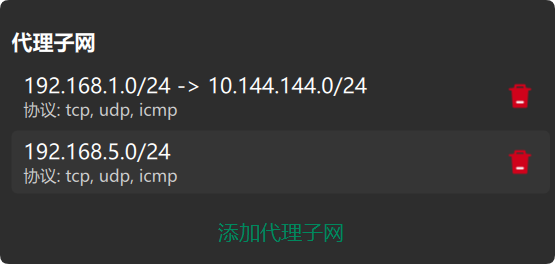
After the instance starts, the subnet proxy information will be automatically synchronized to every node in the virtual network, and each node will automatically configure the corresponding routes.
Firewall Settings
Section titled “Firewall Settings”Since proxy traffic needs to use the system network stack, subnet proxy requires the firewall on the virtual network interface to be disabled.
- On Windows, you can add
qtet-daemon.exeto the firewall exception list, or simply turn off the firewall. - On Linux, you can use iptables or ufw to allow INPUT and OUTPUT traffic on the corresponding virtual network interface.
If the firewall cannot be disabled, you can try using the user-mode network stack for subnet proxy, which avoids the firewall configuration step. Simply enable the “Use User-Mode Protocol Stack” toggle on the advanced settings page.
Manual Route Configuration
Section titled “Manual Route Configuration”By default, when a node in the virtual network is configured with subnet proxy, the proxied subnets are synchronized to all nodes in the virtual network, and a route is automatically generated so that packets destined for these subnets are handled by the virtual network.
This simplifies networking in most cases, but in some scenarios, users may not want QtEasyTier to automatically configure routes on nodes. You can use the Custom Routes parameter to manually configure which traffic should be forwarded to the virtual network.
With Custom Routes enabled, only the subnets configured in this parameter will enter the virtual network. If the list after this parameter is empty, QtEasyTier will not process any traffic for non-virtual-network subnets. For example, if you only want to proxy the traffic of two devices, 192.168.1.1 and 192.168.1.88, to the virtual network, you can add the following parameter.
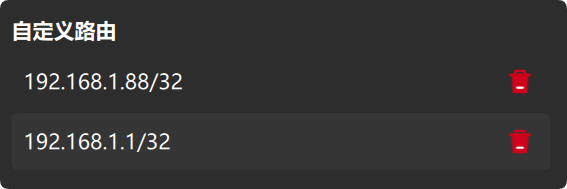
After adding custom routes, the node will only forward traffic of your custom subnets to the virtual network, and will no longer automatically propagate subnet routes of other nodes.
Disabling Built-in NAT
Section titled “Disabling Built-in NAT”By default, built-in NAT is enabled in subnet proxy, handling packet forwarding in user space, so that non-gateway devices can also become subnet entrances while bypassing the restrictions on packet forwarding imposed by different operating systems.
If QtEasyTier runs on a gateway device, you can enable the “System Forwarding (Disable Built-in NAT in Subnet Proxy)” toggle to have the system kernel forward subnet proxy packets, in which case the built-in NAT is disabled.
Note that when this option is enabled, subnet proxy packet forwarding depends entirely on the operating system. Please make sure that the operating system’s firewall, forwarding rules, route rules, etc. are configured correctly.