Connecting to the EasyTier Web Console
QtEasyTier introduced EasyTier Web Console management in version 1.2.0. However, we found that the use cases for this feature were narrow, so it was removed in later versions. Nevertheless, we have noticed that some users have deployed EasyTier Web Console themselves and want a program to connect to it conveniently. Therefore, the following content mainly introduces how to use our project to connect to the EasyTier Web Console.
EasyTier Web Introduction
Section titled “EasyTier Web Introduction”For more information about using the Web Console, please refer to the EasyTier official documentation.
The EasyTier Web Console is a web service in the EasyTier project used to remotely deliver network configurations. Unlike QtEasyTier’s main program, which edits configs and runs networks locally, after connecting this machine to a Web Console, the Web Console can deliver networking configurations to remotely manage this machine’s EasyTier network.
The EasyTier Web Console uses a frontend/backend separated architecture and is designed with 3 services in total:
- Web Frontend (default port 11211)
- Web API Backend (default port 11211)
- Config Delivery Service (default port 22020, default UDP protocol)
Among these, the Web frontend and Web API backend are bound to the same port by default, while the config delivery service is part of the Web API backend. Connecting a local device to a Web Console means connecting and communicating with the config delivery service.
EasyTier Connector Tool
Section titled “EasyTier Connector Tool”To make it more convenient to use the console, we developed a minimal tool for connecting to the EasyTier Web Console called EasyTier Connector. You can find it in the project repository.
Installation
Section titled “Installation”Currently, EasyTier Connector is still in early development and does not yet have packaged installers. For Arch Linux users, you can install and try it via the AUR. For other Linux distributions, you can compile and install it manually. Windows/macOS platforms are not supported yet.
- AUR installation command is as follows:
sudo pacman -S yay # Install the yay client (requires the archlinuxcn repo)yay -S easytier-connector # Install the EasyTier Connector toolThe EasyTier Connector tool adopts a minimal design with no complex UI — it relies on the system tray interface to set the address and connect to the console.
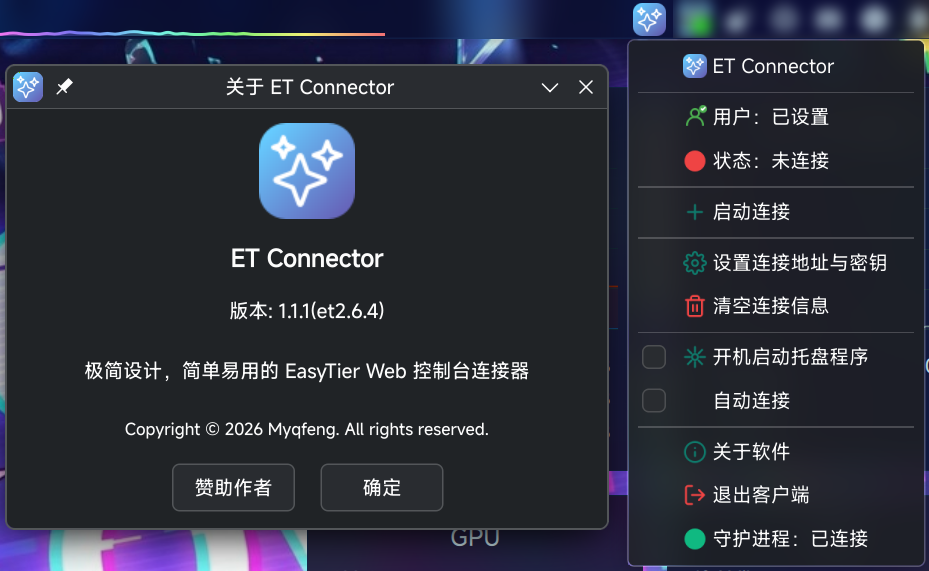
- Double-click the icon to open EasyTier Connector; the program icon will appear in the system tray (note: not the EasyTier main program icon).
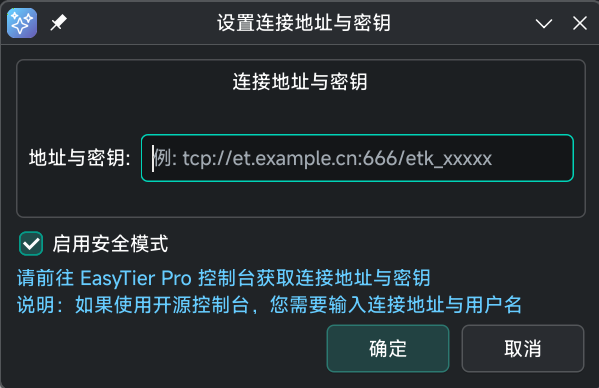
- Right-click the icon and select Set Connection Address & Key in the popup menu, then enter the relevant information.
- For the open-source EasyTier Web Console, you need to enter the config delivery service address, port, and username. Example format:
udp://example.qtet.cn:22020/username- For the EasyTier Pro cross-network service, you need to enter the config delivery service address/key and enable secure mode. Example format:
tcp://et-web.console.easytier.net:22020/etk_xxxxxx